Time within the hands
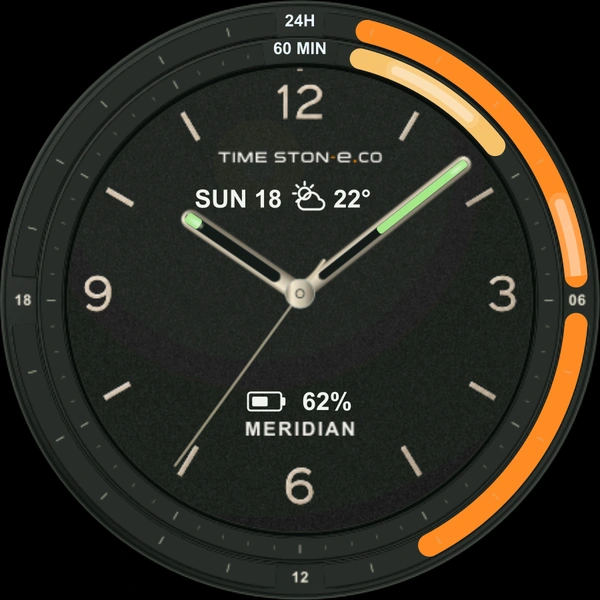
Filled hour and minute hands give familiar analog time a visible sense of progress.



TIME STON-e ATLAS Watch Face
18 styles. Three themes. One purchase.
OBSIDIAN · COBALT · IVORY. Three themes, six designs, 18 analog watch faces. See time progress through filled hands and graphic displays.
Wear OS · Available on Google Play
ATLAS / COLLECTION LOOKBOOK
Explore 18 analog styles, hand fills and time graphics, moon phases and the always-on display.
01 / 18 designs
Design previews from the released version. Time, date, weather and battery values are sample data.
01 / OBSIDIAN
Dark dials with clear accents. Classic hands meet contemporary graphic displays.
02 / COBALT
A calm blue dial with precise markers and carefully placed highlights.
03 / IVORY
Light dials, subtle textures and teal-filled hands for a quieter view of time.
02 / Features
OBSIDIAN · COBALT · IVORY. Three themes, six designs, 18 analog watch faces. See time progress through filled hands and graphic displays.
Filled hour and minute hands give familiar analog time a visible sense of progress.
Turn moving-light effects in the hands and graphs on or off in customization.
See moon phases on designs including STRATUM and TRIAD, alongside battery information.
Time expressed in two outer tracks.
A dial for the sky and the Moon.
Vertical graphs and a lower circular dial.
Classic character in Roman numerals.
Time rising through a curved landscape.
A rhythm expressed in three dials.
03 / TRY THE COLLECTION
Compare all 18 analog faces at a glance. Explore moving hands, graphs and the always-on display under the same settings. Displayed information is sample data.
18 WATCH FACES / OBSIDIAN · COBALT · IVORY
INTERACTIVE / 18-IN-1
3 themes × 6 designs.
Compare all 18 OBSIDIAN, COBALT and IVORY faces on one screen.
Explore moving light, AOD and adjustable playback speed.
04 / TIME IN MOTION
Explore light moving through the hour and minute hands and each model’s graphs. Hand angles and fills follow the sample time.
Compare light in motion across all 18 ATLAS designs. LUNARIS keeps its illuminated outer beads; the lower seconds dial on PARALLAX retains its original movement without decorative motion.
Soft light travels from each hand’s tip toward the center pivot.
Open motion preview ↗A browser preview using sample data. Appearance may differ on your watch and with AOD settings.
06 / GOOD TO KNOW
ATLAS is for compatible round smartwatches running Wear OS 5 or later. This package does not support Apple Watch or Tizen-based Samsung watches. Check your watch’s compatibility on Google Play before purchasing.
In the watch face editor, choose OBSIDIAN, COBALT or IVORY, then MERIDIAN, STRATUM, PARALLAX, LUNARIS, TIDAL or TRIAD. Three collections and six models provide 18 styles. Hand-fill periods are fixed. Turn moving-light effects in the hands and graphs on or off with the Animation setting.
The web preview uses sample time, date, weather and battery data. Weather on your watch requires a compatible complication provider and depends on permissions and device settings. Weekday and date remain in English regardless of device language. Moon phases and time to the next full moon on STRATUM and TRIAD are estimates based on a mean lunar cycle.
The center pivot opens interval timers; the moon window on STRATUM and TRIAD opens moon details. Both require the separate ATLAS Tools app. Taps on complications such as weather depend on the selected provider, installed apps and permissions.
Interval stages, durations, repeats, optional sound/vibration and moon details are provided by the separate Wear OS app ATLAS Tools. It is not installed automatically with the watch face and must be installed separately. The face itself does not run alarms. Basic time, graphs and moon-phase displays work with the watch face alone.